-
All new tables created in transactional system must have a field called 'DLM'. This field will capture the date/time stamp for the last instance this record was modified.
-
All new tables created in transactional system must have a field called 'DATE_CREATED'. This field will capture the date/time stamp when this record was added to this table for the first time.
-
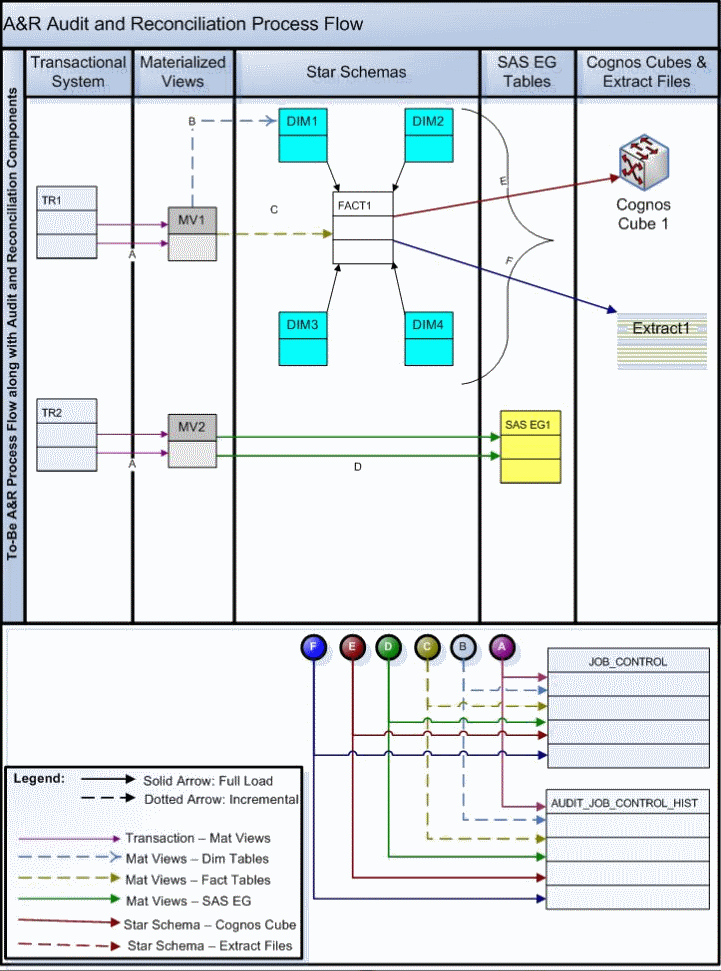
All new tables created in the transactional system must have a corresponding materialized view created in the schema of A&R
-
A new entry must be made in REFRESH_TABLES for each new table added to schema of Transactional Database with the associated refresh order. It is noted that the following two entries in REFRESH_TABLES are purposely made the last materialized views to refresh: HEALTH_RELATED_ACTIVITY, HRA_CASE. These are assigned the REFRESH_ORDER 999 and 998 respectively. The current running REFRESH_ORDER is 334. Any new entry made to this table should be assigned REFRESH_ORDER between 335 and 998. If this range is completely consumed, please contact BIT DBA for allocation of proper range. While allocating a new range, care should be taken to avoid any conflict with the interface range allocated to JOB_IDs in JOB_CONTROL table.
-
For any record present in REFRESH_TABLES if it is desirable to inactivate the materialized view refresh at any given time, then this can be achieved through setting the REFRESH_YN field. If this field is set to N, then the corresponding materialized view will not get refreshed as part of the nightly batch execution. Only if this field is set to 'Y' the corresponding materialized view will get refreshed when REFRESH_SNAPSHOTS procedure is invoked from PADOHSNAP schema through the Appworx batch.
-
Create a new entry in the JOB_CONTROL table. Assign a JOB_ID to the entry according to the purpose of the mapping.
|
|
Parent/Child (Inheritance) and Hierarchical Permissions
For example, the "Patient" grouping has multiple permissions that can be configured, such as read patient name, read patient identifiers, and read patient SSN. These permissions are structured in a hierarchy where an undefined permission inherits its value from its parent permission. This hierarchy model essentially limits the number of permissions that must be set to achieve a desired security policy.
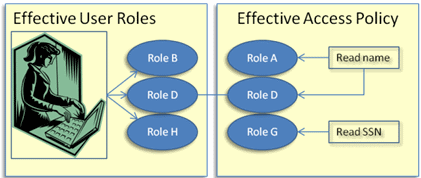
As shown below, the user (with Roles B, D and H assigned) can read the selected patient's name but not the patient's SSN.
|